
Most small business owners think about SEO as writing and keywords. They forget the thing underneath it all: the structure of the site itself. If your pages are organised badly, Google struggles to find them, struggles to understand what matters, and sends fewer visitors even when the content is good.
Website structure is the way your pages are organised and linked together. It is the floor plan of your site. Get it right at the start and every page you add afterwards has a clear place to live. Get it wrong and you end up with a pile of pages that nobody, including Google, can navigate.
Direct answer
Website structure for SEO means organising your pages in a shallow hierarchy so Google and visitors can find everything easily. Use a homepage at the top, a small number of category pages below it, and individual pages under those. Keep every important page within three clicks of the homepage, write short descriptive URLs, and link related pages together.
What is website structure?
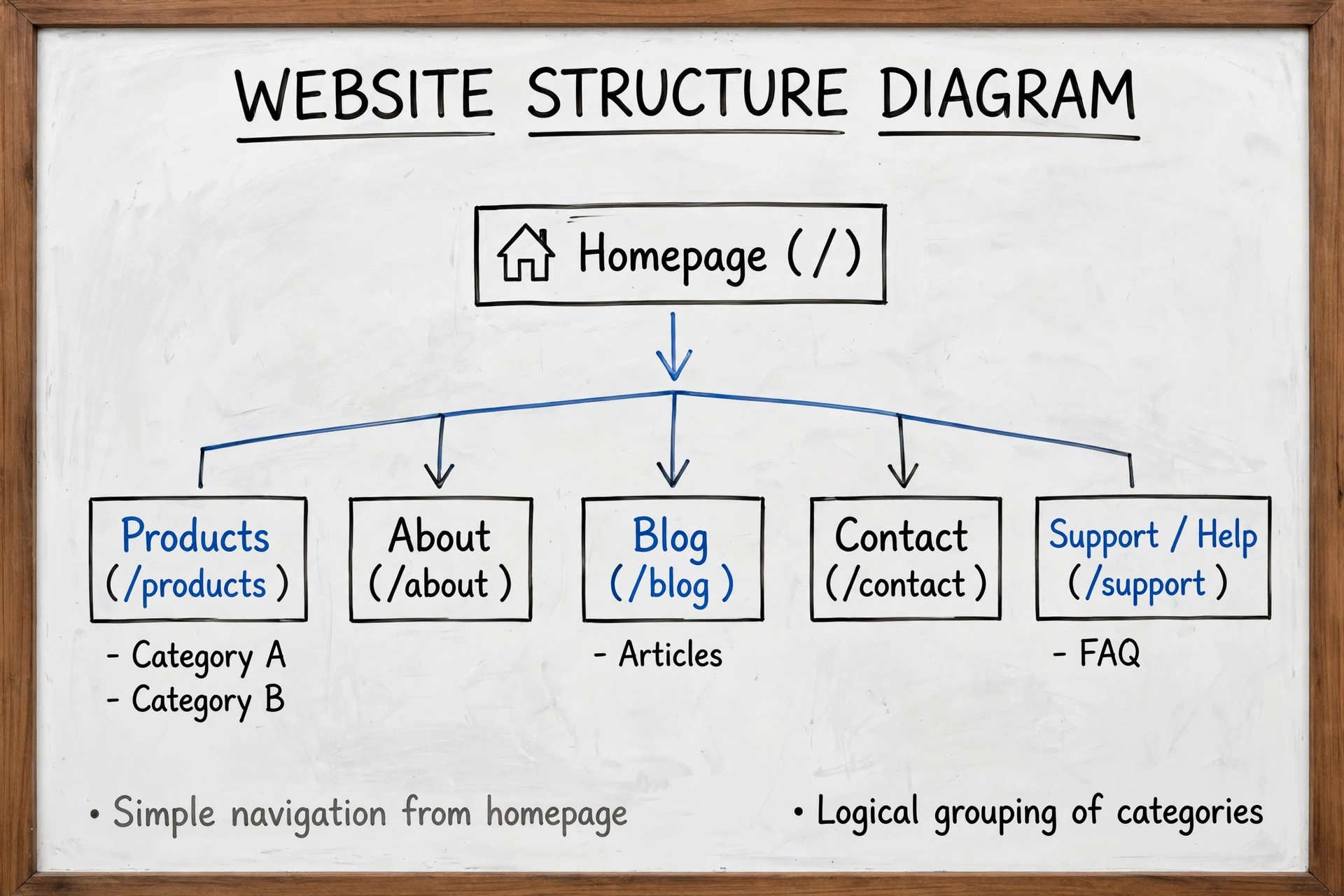
Website structure, also called site architecture, is the organised layout of your pages and the links between them. It is usually drawn as a diagram with the homepage at the top and every other page branching below it.
Think of it like the shelving in a library. If every book has a logical shelf, a visitor finds what they need fast. If the books are piled in random order, the library is useless even though it holds the same books. Your website works the same way. Structure decides whether a page is found or forgotten.
Which website structure works best for a small business?
There are four main models. Almost every small business site should use the first one.
| Structure model | How it works | Best for |
|---|---|---|
| Hierarchical | Homepage branches into categories, then subcategories, then individual pages | Most business and service websites |
| Sequential | Pages follow a fixed order, step by step | Tutorials, onboarding, checkout flows |
| Matrix | Pages link in many directions with no fixed path | Large reference sites and wikis |
| Database | Pages are generated on demand from filters and search | E-commerce shops with thousands of products |
The hierarchical model is a tree. The homepage is the trunk. The main categories are the branches. Individual pages are the leaves. It mirrors how people already think about a business: services at the top, specific offerings beneath, supporting articles below that. A growing online shop is the main exception, because a database model handles thousands of products that no human could organise by hand.
How do you plan a website structure?
Plan the structure before you write a single page. Start with your services, not with your design. List every service you sell and every topic your customers search for, then group them into a small number of themes.
Take a domestic electrician in Sheffield as a worked example. The wrong structure is one page called Services that lists eight jobs. That single page cannot rank for eight different searches, because each search deserves a page of its own. The right structure is one page per job.
| Level | Pages on the electrician site |
|---|---|
| Homepage | Electrician in Sheffield, with links to every main page |
| Service pages | Rewiring, fuse board replacement, EV charger installation, emergency electrician |
| Support pages | EICR and electrical safety certificates, areas covered, prices, FAQs |
| Blog pages | Guides such as how to reset a tripped fuse board, or when rewiring is needed |
| Business pages | About, contact, reviews |
Each service page targets a real search with real intent behind it. Each blog page answers a question and links to the service page it supports. That is the whole plan. Before you build, read our guide on how to do keyword research for a small business website, because the structure should follow what people actually search for, not what you happen to sell.
How shallow should your structure be?
Shallow means few clicks. Every important page should sit close to the homepage. The widely used target is the three-click rule: any important page should be reachable within three clicks from the homepage. The profiletree guide calls this a useful target rather than a law. What actually matters is that important pages are shallow and that no page is left with no links pointing to it at all.
Depth becomes a problem when it hides content. A page buried five clicks deep gets far less attention from Google than the same page one click from the homepage. Google’s John Mueller has said publicly that click depth carries more weight for SEO than URL structure, according to the digifix guide. So a short URL does not rescue a page that is buried deep in the site. Fix the clicks first.
For a small business site, almost everything should sit within two clicks. For a larger site with hundreds of pages, three or four clicks is reasonable for deeper content, as long as the commercial pages, the ones that win you work, stay near the top.
How many categories should a site have?
Fewer than you think. Most small business sites overcomplicate the main menu. They add every service, every audience and every nice to have page to the top navigation, and the menu becomes a wall of links nobody reads.
The x8webdesign guide notes that websites should keep between two and seven main categories. A service business might use five: Services, Prices, Areas, Guides and About. Each category then holds a handful of pages. If you have more than seven top level items, group some of them together or move them into the footer. A menu with five clear choices beats a menu with fifteen.
How do you write clean URLs?
A URL should tell a visitor and Google what the page is about, in a few words. Keep URLs short, lowercase, hyphenated and descriptive. Your site address followed by fuse-board-replacement is clear. The same page at services/electrical/domestic/fuse-boards-and-consumer-units-replacement-service is not.
| URL | Verdict |
|---|---|
| yoursite.co.uk/fuse-board-replacement | Short, clear, describes the page |
| yoursite.co.uk/services | Too vague, could mean anything |
| yoursite.co.uk/?page_id=47 | No words at all, useless for SEO |
| yoursite.co.uk/services/electrical/domestic/fuse-boards-and-consumer-units-replacement-service | Far too long, repeats words, hard to share |
Set the permalink structure to Post name in WordPress and write the slug by hand for each page. Use the keyphrase for that page, and nothing extra.
What are breadcrumbs and do you need them?
Breadcrumbs are the small trail of links at the top of a page, such as Home, then Services, then Fuse Board Replacement. They show the visitor where they are in the structure, and they give Google the same information in a form it can read easily.
Most WordPress themes can show breadcrumbs, and Yoast SEO can add them for you. Turn them on for every page below the homepage. They cost nothing, they help visitors, and they reinforce the hierarchy you have built.
How does internal linking fit into structure?
Structure is the skeleton. Internal links are the joints. A page that has no links pointing to it is called an orphan page, and Google struggles to find it even if it sits in your sitemap. Every page needs at least one link from another page on your site, and important pages need several.
Link related pages together with descriptive anchor text. A guide about rewiring should link to your rewiring service page. A service page should link to the guides that support it. Read our guide to internal linking for SEO to see how to build those links so Google can follow them and visitors can use them.
How do you fix a messy structure without losing rankings?
Most small business sites grow messy over time. Pages get added without a plan, menus swell, and old pages sit orphaned. Fixing it is a careful job, not a demolition.
First, list every page on the site. Your XML sitemap is a good starting point. Then decide what each page is for. Group them into the categories from your plan. Pages that cover the same topic should be merged into one stronger page, with a 301 redirect from the old address to the new one.
Next, fix the navigation. Reduce the top menu to your main categories. Move the rest into the footer or into category pages. Then add internal links so every page has at least one link pointing to it from a related page. Finally, check that every important page is within three clicks of the homepage.
Do not delete pages in bulk and do not change URLs without redirects. A redirect tells Google the page has moved permanently, so its value follows it to the new address. Without a redirect, the value is lost and visitors hit an error page.
FAQ
What is website structure in SEO?
It is the way your pages are organised and linked together. A clear structure helps Google find, understand and rank your pages, and helps visitors find what they need.
How many clicks deep should a page be?
Every important page should be within three clicks of the homepage, and your most valuable pages within two. Pages buried deeper get far less attention from Google.
What is the best structure for a small business website?
A hierarchical structure: homepage at the top, a small number of category pages below it, and individual pages under those. It suits almost every service business.
Do URLs matter for website structure?
Yes. Short, descriptive, lowercase URLs tell Google and visitors what a page is about. Long URLs with repeated words or page numbers do not.
Can I change my website structure after the site is live?
Yes, but carefully. Group pages into categories, merge duplicates, and use 301 redirects whenever an address changes, so no ranking value is lost.
Conclusion
Website structure is not a technical extra. It is the foundation your SEO sits on. Plan a shallow hierarchy with a handful of categories, give every service its own page, write short descriptive URLs, turn on breadcrumbs, and link every page into the site so nothing is orphaned. Fix a messy structure by grouping, merging and redirecting, never by deleting in bulk. Get the structure right and every page you publish afterwards starts with a head start.