
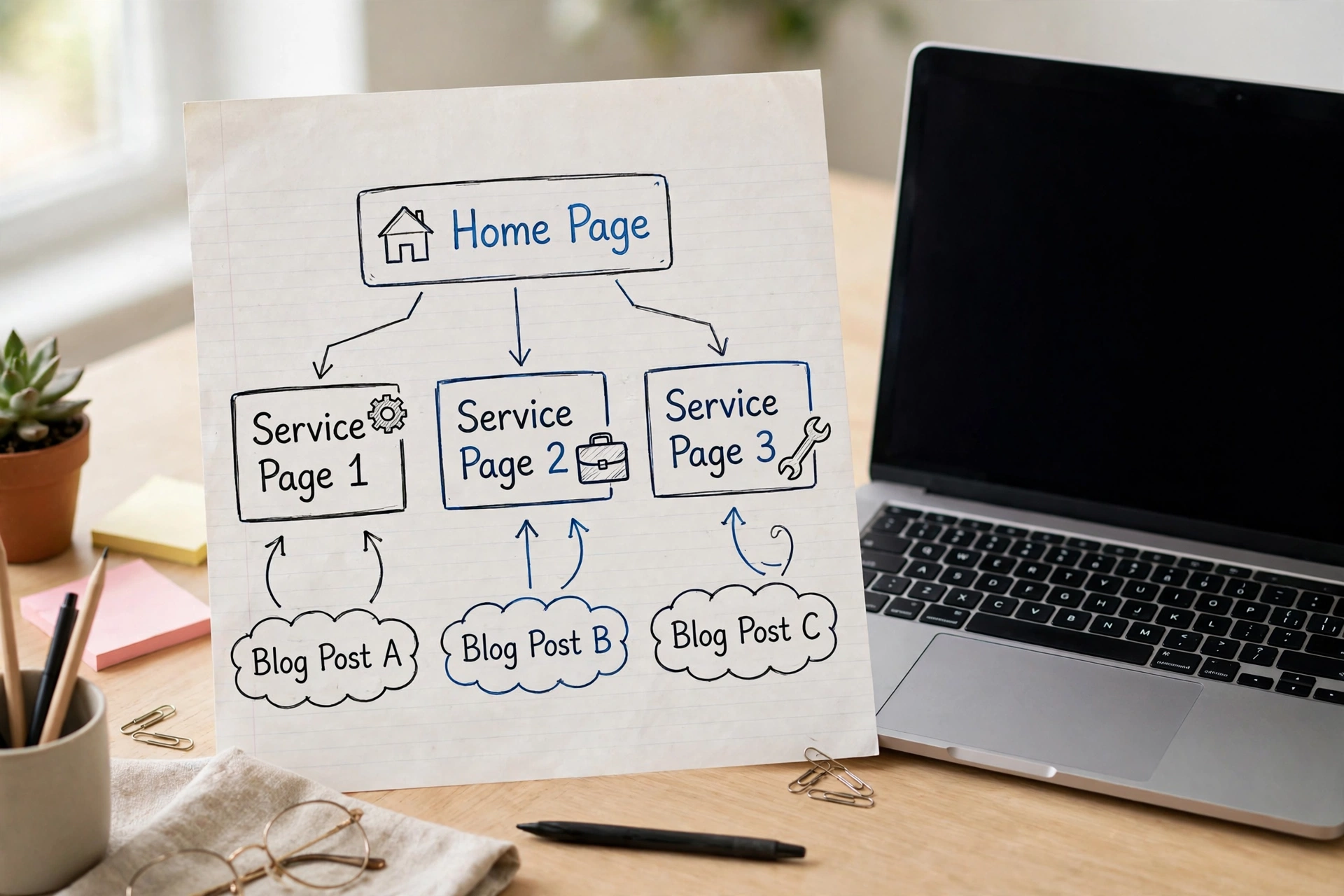
Direct answer: Internal linking means adding links from one page on your website to another page on the same website. It helps visitors find related pages, and it helps Google discover pages, understand what each page covers, and decide which pages matter most. For a small business site, a hub structure and descriptive anchor text are enough to get the benefit.
What is internal linking?
An internal link is a link from one page on your website to another page on the same website. A link from your home page to your services page is an internal link. A link from a blog post to a related service page is an internal link. Links in your menu, footer or body text all count.
This is different from an external link, which points to a different website, and from a backlink, which is a link from a different website pointing to yours. Internal links are the only links you fully control, and most small sites underuse them.
Why internal links matter for SEO
Google finds most new pages by following links. A page with no internal links pointing to it is called an orphan page. It may still appear in your sitemap, but a sitemap alone is weaker than a real link from a related page.
Internal links do three jobs at once. They help Google discover pages and work out how pages relate. They signal which pages matter most. And they help visitors reach the service a blog post describes, instead of searching again.
Table 1 (Link type | Where it points | Main job):
| Link type | Where it points | Main job |
|---|---|---|
| Internal link | Another page on your own site | Help visitors and Google move around your site |
| External link | A page on a different site | Point readers to a useful source you do not own |
| Backlink | Your site, from a different site | Show Google another site found your page worth linking to |
| No link at all | Nowhere | The page depends on the sitemap alone |
A small site does not need hundreds of links. It needs the right links, in the right places, using words that describe the destination.
Build a simple structure: hub and spoke
Think of your site as a tree with three levels. Level 1 is the home page, which links to every main service or category. Level 2 is the hub pages. Each service page links down to its detailed pages. Level 3 is the detail pages. Each blog post links back up to its hub.
With this shape, every important page sits two or three clicks from the home page. Pages buried deeper tend to be crawled less often and perform worse. Take a plumber with three services. The home page links to all three. Each service page links to the posts that support it. That is the whole system.
Anchor text: the words you click
Anchor text is the visible, clickable text of a link. It tells readers and Google what the linked page is about. Good anchor text names the destination in plain words. Use “boiler repair in Leeds” to link to your boiler repair page. Avoid “click here” and “read more” on their own, because they say nothing about the destination. Avoid repeating the exact same anchor text on every page, and avoid stuffing keywords into link text where they do not belong naturally.
Where to add internal links
Add links where they help the reader go deeper, inside the body text. A service page can link to a blog post that answers a common question. A blog post can link to the service page it describes. Your menu and footer should carry the most important pages, and your home page should link to the pages that earn you enquiries.
There is no fixed number of links per page. A few well placed links in each post are better than many forced ones. Link to a new page from an older page that already gets visitors.
Table 2 (Placement | When it works | When it fails):
| Placement | When it works | When it fails |
|---|---|---|
| Inside body text | The reader wants more detail and the link gives it | The link points to an unrelated page |
| Menu and footer | The page matters to every visitor | The menu is filled with minor pages |
| Home page | The linked page earns enquiries | The home page links to old blog posts instead |
| Related posts box | The posts share a clear topic | The box shows random posts |
How to find orphan pages and fix them
An orphan page has no internal links pointing to it. Finding them takes about 30 minutes on a small site.
List your important pages first. Then check each one in Google Search Console, in the Links report. A free crawler such as Screaming Frog, free for small sites, can list pages with no internal links pointing to them. Link to each orphan from a related hub page and one related post. If a page is no longer useful, remove it or redirect it. Repeat this check monthly.
Internal linking on WordPress
WordPress makes this job easier, but it does not do it for you. Use the link button in the editor and choose the exact page. Check that each link uses a real HTML link with an href attribute. Yoast SEO and Link Whisper can suggest links, but neither replaces judgement. Keep one H1 per page.
Common mistakes to avoid
Linking to the same page with the same anchor text everywhere. Linking every page to every other page. Using nofollow on internal links: Google reserves that attribute for links you do not fully trust, such as user comments or sponsored content, not for links inside your own site. Linking through redirects: link to the current address. Adding links for the sake of it: if a link does not help the reader, leave it out.
Frequently asked questions
How many internal links should a page have? There is no fixed number. A few to a dozen in a long article is normal. Add a link when it helps the reader go deeper, and focus on relevance rather than a count.
What is an orphan page? An orphan page is a page with no internal links pointing to it from anywhere else on the same site. It may still be in the sitemap, but it is harder for Google to find and harder for visitors to reach.
Does internal linking help a new website rank? It helps Google discover new pages and understand how they fit together. It will not rescue weak content on its own.
Conclusion
Internal linking is one of the few parts of SEO you fully control, and it costs nothing but time. Keep a simple hub structure, use descriptive anchor text, and check for orphan pages once a month.