
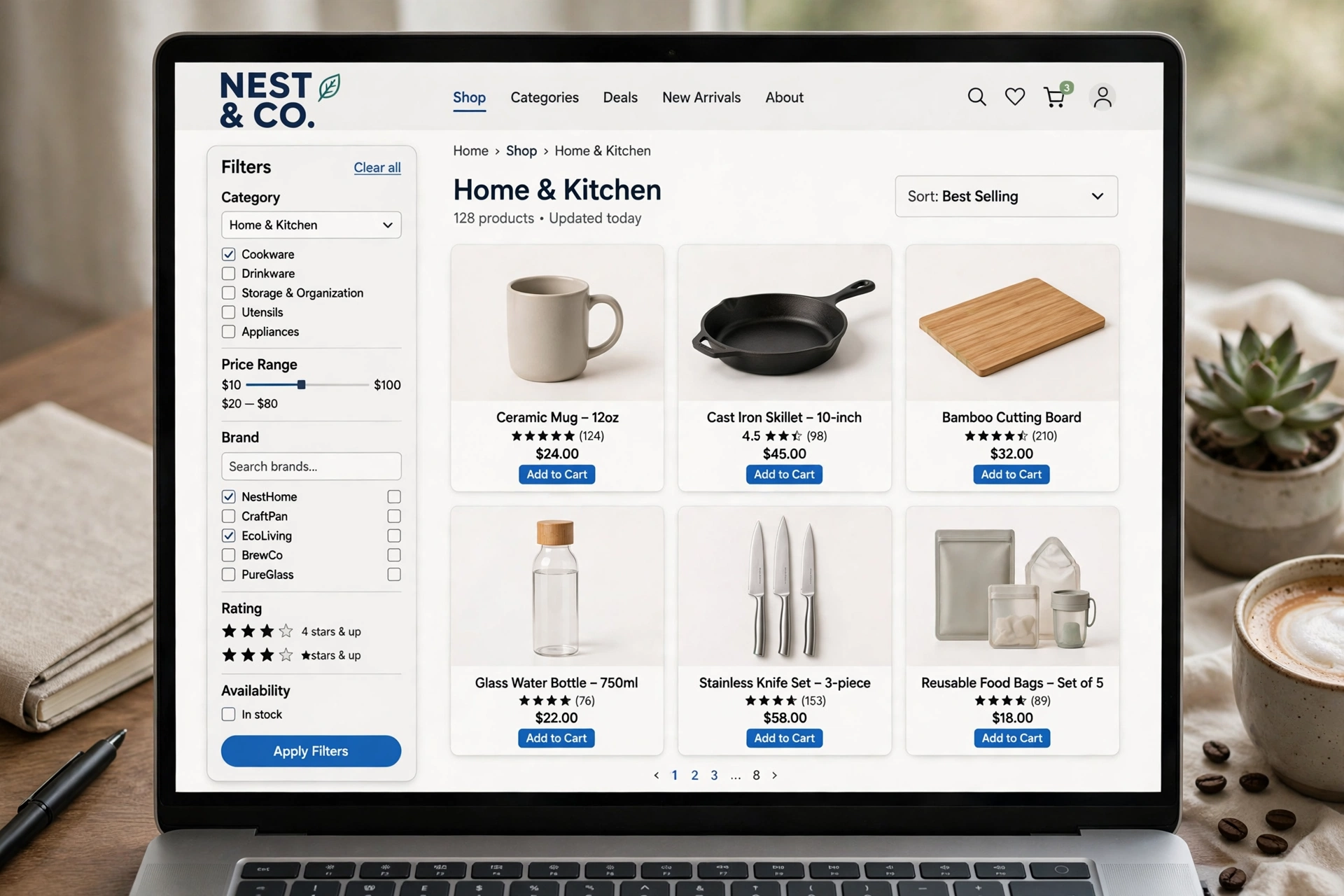
When a shopper searches for “men’s running shoes” or “wooden dining tables” or “soy candles”, they are not looking for one product. They are looking for a choice. They want to compare options, filter by size or price, and pick the one that fits. The page that serves that search is not a product page. It is a category page, a collection of products under one heading.
Category pages are often the most neglected pages on a small shop. They get a one line description, or no description at all, and a grid of products with no words to explain what the category is for. That is a missed chance, because category pages target the broad searches that bring the most visitors, and they can drive more traffic and more sales than any single product page underneath them.
This guide explains how to optimise a category page for a small shop: one target query per category, a short intro above the products, a buying guide below them, clean filters and pagination, and links that help Google understand which pages matter most.
Direct answer
Optimise a category page by giving it one target query, a clear H1 and title on that query, a short intro above the products, a useful buying guide below them, crawlable links to every product, and filters that do not create thousands of duplicate URLs for Google to crawl.
Why do category pages matter more than product pages?
Product pages target narrow searches. A shopper who searches for a specific model already knows what they want, and they will land on the product page for that model. Category pages target broad searches. A shopper who searches for a type of product, such as running shoes or dining tables, has not chosen a model yet, and they will land on the category page that lists the options.
Broad searches bring more visitors, because more people search for a type than for a single model. They also bring visitors earlier in the buying process, when they are still comparing. A good category page helps those visitors compare, and it turns a broad search into a sale on one of the products underneath it.
Category pages drive 30 to 50 percent of an ecommerce store’s organic traffic, per store-vitals.com. That is a wide range, and it will vary by shop, but it shows the scale. For many shops, category pages bring in about a third to a half of all organic visits. A single category page can drive 5 to 10 times the organic revenue of any individual product page underneath it, per lawrencehitches.com, from StudioHawk audits. One strong category page can be worth more than a dozen product pages that rank for narrow phrases only.
Product pages still matter. They close the sale. But without a strong category page above them, many shoppers will never reach the product pages at all, because they will land on a competitor’s category page instead. That is why category SEO deserves the same care as product SEO, and why this guide treats categories as the main landing pages for broad commercial searches.
How do you pick one target query per category?
Each category needs one target query, and only one. That query should be the phrase a shopper would type when they want to browse that type of product, not a specific model, not a brand, and not a vague word that could mean anything.
Start with the category as it already exists. If you sell “men’s running shoes”, that is the query. If you sell “wooden dining tables”, that is the query. If you sell “soy candles”, that is the query. Do not try to target two different phrases on the same page, such as “men’s running shoes” and “women’s running shoes”, because Google will not know which one the page is about, and the page will rank weakly for both.
Check the query in Google before you commit to it. Look at the top results. Are they category pages from shops, or are they guides, articles or product pages? If the top results are category pages, the query is a category query and your page fits. If the top results are guides, the query may be an information query, and a guide would rank better than a category page. If the top results are single product pages, the query may be too narrow for a category.
Do not create a category for every phrase you can think of. A shop with twenty categories that each have two products will rank worse than a shop with eight categories that each have a real choice. Merge thin categories where the products overlap, and give each remaining category enough products to be worth browsing.
What should the title and H1 say?
The title tag and the H1 should both use the target query, in plain words, with no stuffing and no extra phrases that add nothing. The title can add a short benefit or a brand name at the end, such as “Men’s Running Shoes, Free UK Delivery, Your Shop Name”. The H1 should be the query itself, or the query with one short clarifier, such as “Men’s Running Shoes”.
Do not write a title that is a list of phrases. A title such as “Men’s Running Shoes, Running Trainers, Mens Trainers, Cheap Running Shoes” looks like spam to Google and to shoppers. One phrase, written naturally, is enough. Google will understand the variants from the rest of the page.
The H1 should be the only H1 on the page. The category name in the page header is often the H1 already, so check that there is not a second H1 in the intro or the buying guide. If the theme adds an H1 to the category name, use H2s for the sections below it, and H3s for the subsections inside them.
What goes above the product grid?
Above the fold means H1 plus a 50 to 100 word intro, per lawrencehitches.com. That intro sits above the product grid, under the H1, and it has a simple job: tell the shopper what the category is, who it is for, and what they will find in it.
Write the intro for the shopper first. Say what the category covers, what makes your range different, and what to look for when choosing. Do not write a keyword stuffed paragraph that repeats the target phrase three times. One natural use of the phrase in the intro is enough, with a variant or two where they fit.
Keep the intro short. Fifty to 100 words is the guide, and it is a good limit for a small shop. A longer intro above the products pushes the products down the page, and shoppers who want to browse will have to scroll past a wall of text to reach them. The longer content belongs below the grid, where it does not get in the way of shopping.
The intro should also say, in plain words, what a shopper will find if they scroll down. A line such as “Below the products you will find a short buying guide on sizes, materials and care” tells the shopper the guide is there, and it tells Google the page has more than a list of products.
What goes below the product grid?
Below the product grid means 400 to 600 words of buying guide, common mistakes and FAQ, per lawrencehitches.com. The task summary for this draft gives a slightly wider range, 300 to 800 words, and both point to the same idea: a useful guide below the products, long enough to answer the questions that matter, short enough to be read.
The buying guide should answer the questions a shopper asks when they are choosing between products in the category. For running shoes, that means fit, cushioning, use on road or trail, and when to replace them. For dining tables, that means size for the room, material, shape and care. For candles, that means burn time, scent strength, room size and safety. Write the guide for your category, not a generic guide that could fit any shop.
Structure the guide with question headings. Use H2s such as “How do I choose the right size?” and “What material should I pick?” and “What mistakes should I avoid?” Each section should be two or three short paragraphs, or a short list where a list is clearer. Add a short FAQ at the end of the guide, with four or five questions and short answers, so the page can answer the same questions in search results.
Do not copy the buying guide from another shop, and do not use the same guide on two categories with only the category name changed. A guide that says the same thing on every category page is duplicate content, and Google will ignore it. Write a fresh guide for each important category, even if it takes an hour. The categories that bring the most traffic deserve that hour.
How should product cards work for SEO?
A category page is only useful if Google can follow it to the products underneath it. That means every product card must be a real link, with the product name as the link text, and a real product page behind it. A card that is a picture with no link, or a link that only works with JavaScript, will not be crawled, and the product behind it will be hard for Google to find.
Each product card should show the product name, the price, a rating where you have one, and availability, in real text that Google can read. Do not put the price or the name only in an image, because Google cannot read text in an image. Keep the product name short and accurate, and make sure it matches the name on the product page itself.
A category page needs a clear H1 and title on the target query, a short intro above the products, a useful buying guide below them, crawlable links to every product, clean pagination, and filters that do not flood Google with thousands of near duplicate URLs, per sorank.com. That is the full checklist for the page, and the product cards are the part that connects the category to the products. If the links are missing, the rest of the page cannot do its job.
Use the same product page setup for every product in the category. If you want the detail on how a product page should be built, read our guide to ecommerce product page SEO. It covers the title, the description, the images and the technical setup that sit underneath the category page.
How do filters and faceted navigation work?
Filters let a shopper narrow a category by size, colour, price, material or brand. They are useful for shoppers, and they are a risk for SEO, because each combination of filters can create a new URL. A category with five filters can create thousands of URLs, most of which nobody searches for, and Google can waste time crawling them instead of finding your real pages.
Google’s guide to managing faceted navigation warns that filter URLs can waste server resources and slow the discovery of new pages, per sorank.com. That is the risk in plain terms. If Google spends its crawl time on filter URLs, it will be slower to find new products and new guides.
The fix is simple. Only index filter combinations people actually search for, and block the rest. If shoppers search for “men’s running shoes size 10” or “wooden dining tables under 500 pounds”, those combinations may be worth indexing as landing pages. If nobody searches for a combination of three filters at once, block that URL from being indexed, and let shoppers use it to browse without Google having to crawl it.
Use a canonical tag on filter pages to point back to the main category page, unless the filter page is one you have chosen to index. Use noindex on filter combinations that are not worth indexing. Check with your developer or your SEO plugin how to set this up on your platform, because the setting varies by shop system. Do not try to block filters with robots.txt alone, because that can stop Google from following the links inside the filter page as well.
| Filter choice | What to do | Why |
|---|---|---|
| A filter people search for | Index it as a landing page, with a title and intro | It can rank for a real search phrase |
| A filter people use to browse | Let shoppers use it, but do not index the URL | It helps shopping without wasting crawl time |
| A combination of three or more filters | Block it from indexing | Nobody searches for it, and it creates duplicate URLs |
| A filter with no products | Show no products, and do not index it | An empty page has nothing to rank for |
What are the pagination rules?
Pagination is the set of pages that split a long category into smaller pages: page 1, page 2, page 3, and so on. It matters for SEO because Google needs to find every product, even the ones on page 5, and because a category with duplicate content across pages can confuse Google.
Keep pagination simple. Use numbered pages with clear links, not a “load more” button that only works with JavaScript. A load more button is fine for shoppers, but Google cannot click it, so it will not find the products that only appear after the button is clicked. If you use load more, make sure there is also a paginated version Google can follow.
Make sure each paginated page has a distinct title and a canonical tag that points to itself, not to page 1. The products on page 2 are different from the products on page 1, so they should not all point to page 1 as the main version. Keep the intro and buying guide on page 1 only, so the later pages do not repeat the same text and create duplicate content.
Check that the pagination links work without JavaScript, and that they are in the HTML of the page. If the links are only added by a script after the page loads, Google may not see them, and the products on later pages may never be crawled.
What should you do with empty categories?
An empty category is a category with no products in it. It can happen when a range is out of stock, when a season ends, or when a category was created for products that never arrived. An empty category should not stay live as an empty page.
If the category will have products again soon, keep the page live but say so plainly, and show related products or a link to a similar category. If the category will not have products again, remove the page and redirect it to the closest live category, or to the shop homepage if there is no close match. Do not leave an empty page live with no products and no text, because it has nothing to offer a shopper or Google.
Google’s own guidance is that a category with no products should return a 404, or be removed, rather than staying live as an empty page. That is the rule to follow when a category is gone for good. A 404 tells Google the page is gone, and a redirect tells Google where the closest live page is. Either is better than an empty page that wastes crawl time.
How does internal linking help category pages?
Internal links tell Google which pages matter most, and they help shoppers move from a guide to a category and from a category to a product. Google’s documentation on ecommerce site structure recommends linking from menus to category pages, from category pages to sub-category pages, and says the more links a page has to it within a site, the higher the relative importance, per sorank.com.
That means your main categories should be in the main menu, not buried three clicks from the homepage. Subcategories should be linked from their parent category, and product pages should link back up to their category. A product page that links back to its category helps Google understand the structure, and it helps a shopper who wants to compare other products in the same range.
Guides and blog posts should link to the categories they mention, where it helps the reader. A guide on how to choose running shoes should link to the running shoes category. A guide on dining room furniture should link to the dining tables category. Those links pass value from the guide to the category, and they help a reader who is ready to shop.
To see how a shallow, clear structure works for a small business site, read our guide to website structure for SEO. It explains how to keep every important page within three clicks of the homepage, and how to link categories, guides and product pages together so Google can find them all.
What are the common mistakes?
The table below lists the mistakes that appear most often on small shop category pages, and the fix for each one. Check your own categories against it, and fix the mistakes that apply to your best selling categories first.
| Mistake | Why it hurts | Fix |
|---|---|---|
| No intro and no buying guide | Google sees only a list of products, with no words to rank for | Add a 50 to 100 word intro above the grid and a 300 to 800 word guide below it |
| Same intro on every category | Duplicate content that Google will ignore | Write a fresh intro and guide for each important category |
| One category for every phrase | Thin categories with two products each | Merge thin categories and give each one a real choice |
| Filters create thousands of URLs | Google wastes crawl time on duplicates | Index only the filter combinations people search for, block the rest |
| Load more button only, no pagination | Google cannot find products past the first page | Add numbered pagination with real links Google can follow |
| Empty categories left live | Empty pages with nothing to offer | Remove the category, redirect it, or say plainly when products will return |
| Product cards with no real links | Google cannot crawl to the product pages | Make every card a real link with the product name as the link text |
A checklist for each category page
Use this checklist for every category that matters to your shop. Work through it in order, and do not publish a new category until it passes.
| Check | Question to ask before you publish |
|---|---|
| Target query | Does the category have one target query, and does the title and H1 use it naturally? |
| Intro | Is there a 50 to 100 word intro above the products, written for the shopper? |
| Buying guide | Is there a 300 to 800 word guide below the grid, with question headings and a short FAQ? |
| Product cards | Does every card link to a real product page, with name, price and availability in real text? |
| Filters | Are only the filter combinations people search for indexed, and the rest blocked? |
| Pagination | Are there numbered pages with real links, and does each page have its own title and canonical tag? |
| Internal links | Is the category in the main menu, linked from its parent, and linked from relevant guides? |
| Empty check | Does the category have enough products to be worth browsing, or should it be merged? |
If a category fails a check, fix that check before you move on to the next category. Start with the categories that bring the most traffic and the most sales, because they are the ones where a fix will pay back fastest.
Frequently asked questions
What is a category page in ecommerce?
It is a page that lists a collection of products under one heading, such as men’s running shoes or wooden dining tables, with filters and sorting to help a shopper compare options before they choose one product.
How many words should a category page have?
Above the fold means H1 plus a 50 to 100 word intro, and below the product grid means 400 to 600 words of buying guide, common mistakes and FAQ, per lawrencehitches.com. A guide of 300 to 800 words below the grid is a good range for a small shop.
Should I index filter pages?
Only the filter combinations people actually search for. Google’s guide to managing faceted navigation warns that filter URLs can waste server resources and slow the discovery of new pages, per sorank.com. Block the rest from indexing.
What should I do with an empty category?
If products will return soon, say so and show related products. If the category is gone for good, remove the page and redirect it to the closest live category, or let it return a 404, per Google’s guidance.
Why do category pages matter more than product pages for broad searches?
Because they target the broad queries shoppers use when they are still comparing, and category pages drive 30 to 50 percent of an ecommerce store’s organic traffic, per store-vitals.com. A single category page can drive 5 to 10 times the organic revenue of any individual product page underneath it, per lawrencehitches.com, from StudioHawk audits.
Conclusion
Category pages are the landing pages for the broad searches that bring most shoppers to a shop, and they deserve the same care as product pages. Give each category one target query, a clear title and H1, a short intro above the products and a useful buying guide below them, with crawlable links to every product, clean pagination and filters that do not flood Google with duplicates. Link categories from menus, guides and product pages, fix the common mistakes, and work through the checklist for each important category in turn. A shop that gets its categories right will bring in more visitors, help them compare, and turn more of those broad searches into sales on the products underneath.