
Direct answer
Technical SEO is the work of making sure Google can find your website, read it properly and trust it enough to show it in search results. It covers crawl access, indexing, site speed, mobile use, site structure and schema. It is the foundation under your content: if the foundation is broken, even good pages struggle to rank.
Intro
Most small business owners have heard of SEO, and most of them think it means writing blog posts and adding keywords. That is only part of the story. Before Google can rank your content at all, it has to find your site, open your pages, read them properly and decide they are safe to show. The work that makes all of that possible is called technical SEO.
Technical SEO sounds like a job for a developer, and some parts of it are. But the idea behind it is simple, and a business owner who understands the idea can spot problems early, ask better questions of whoever looks after the site, and avoid paying for fixes that were never needed. This guide explains it in plain English, with no jargon and no code.
Think of your website as a house. Your content is the furniture and the decoration inside it. Your keywords are the signs on the doors. Technical SEO is the foundation, the wiring and the plumbing. Nobody visits a house to admire the foundation, but if the foundation cracks, the whole house is in trouble. A site with good content and broken technical SEO is the same: the good work inside it never gets the visitors it deserves.
What is technical SEO in simple terms?
Technical SEO is everything you do to help search engines reach, understand and store your pages. It does not change what your pages say. It changes whether Google can get to them, whether it can read them, and whether it believes they are worth showing to searchers.
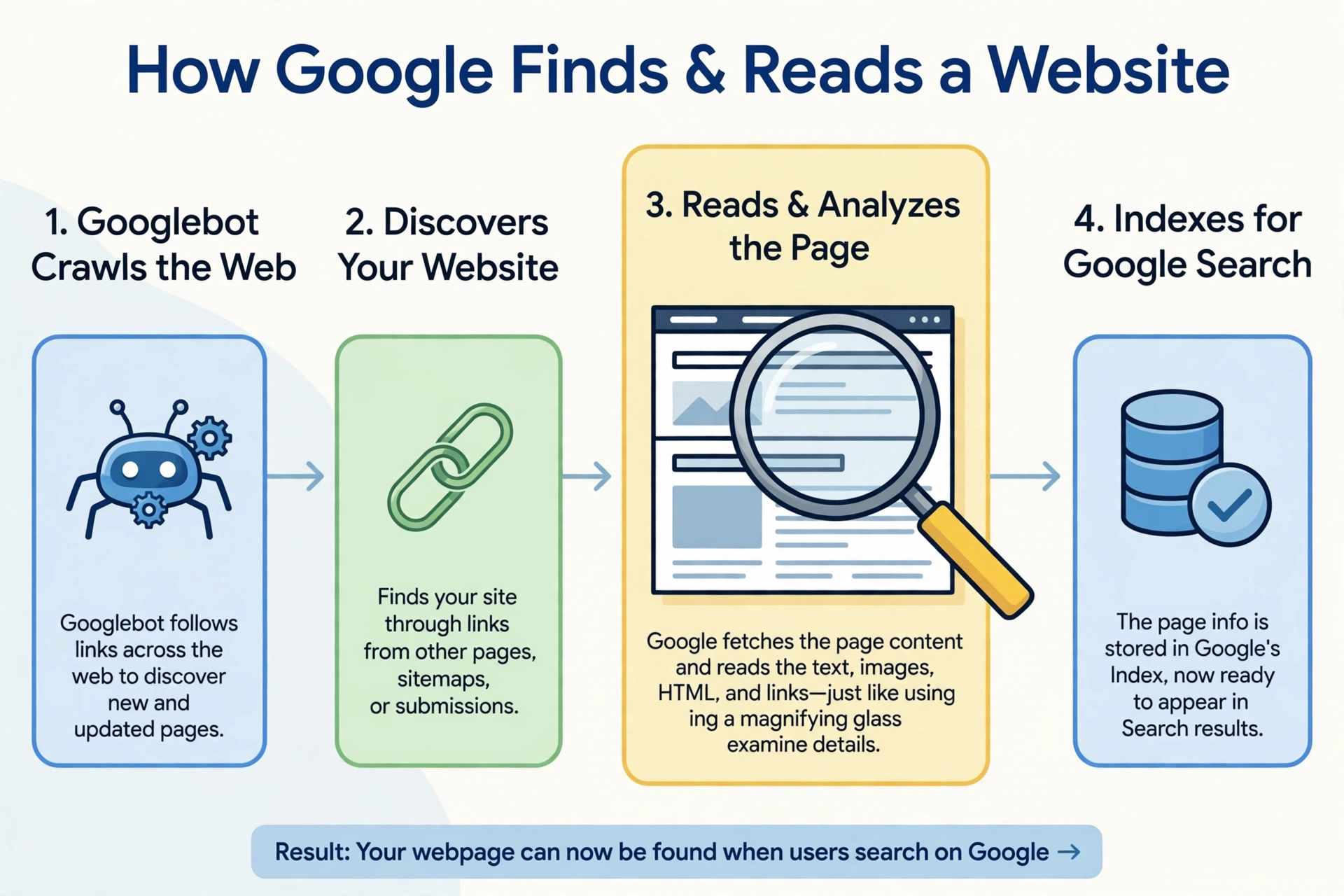
A normal visitor arrives through a link or a bookmark and sees the finished page. Google arrives differently. It sends a program called Googlebot to crawl the web, following links from page to page and collecting what it finds. If Googlebot cannot reach a page, cannot open it, or cannot read the important parts of it, that page may never appear in search results, no matter how good the writing is.
That is the whole job in one sentence: remove the obstacles between Google and your content, so your content gets a fair chance to rank.
What does Google do with your site?
Google handles a page in three steps, and technical SEO touches all three. Knowing the steps helps you understand why a small technical fault can have a big effect.
| Step | What Google does | What can go wrong |
|---|---|---|
| Crawl | Googlebot follows links to find your pages | Blocked pages, broken links, pages with no links at all |
| Index | Google stores a copy of the page and works out what it is about | Duplicate pages, thin pages, pages Google is told to ignore |
| Rank | Google picks the best pages for each search | Slow pages, poor mobile experience, weak structure |
Crawling comes first. Googlebot starts from pages it already knows and follows the links on them. A page with no links pointing to it is hard to find, even if it is listed in your sitemap. A page blocked by a setting in WordPress, or by a robots file that says do not enter, will not be crawled at all.
Indexing comes next. Google keeps a copy of the page and decides what it is about. If two pages on your site say almost the same thing, Google may index only one of them. If a page is marked noindex, Google will not store it for search at all, which is correct for a private page and a disaster for a service page.
Ranking comes last. Only indexed pages can rank, and Google then compares them with every other indexed page on the same topic. Speed, mobile friendliness and structure all feed into that comparison. A page that is hard to use on a phone, or slow to load, starts the ranking contest at a disadvantage.
Google’s own Search Essentials guidance sets out the basic test a page must pass to be eligible for indexing. The hyperank guide summarises it clearly: Googlebot must not be blocked from the page, the page must work and return an HTTP 200 status, and the page must have indexable content. If any one of those three fails, the page cannot appear in search results. That is a useful check to remember, because it turns a vague worry into three questions you can answer.
What does technical SEO cover?
Technical SEO is a broad label, but for a small business site it breaks down into six parts. You do not need to master all six. You need to know what each one does, so you can tell which one is causing a problem.
| Element | What it means in plain English | Why it matters |
|---|---|---|
| Crawl access | Googlebot can reach your pages | No crawl means no ranking, full stop |
| Indexing signals | You tell Google which pages to keep and which to ignore | Stops duplicate and private pages wasting Google’s attention |
| Site speed | Pages load fast, especially on a phone | Slow pages lose visitors and rank worse |
| Mobile friendliness | Pages work well on a small screen | Most searches now happen on a phone |
| Site structure | Pages sit in a clear hierarchy with short URLs | Helps Google and visitors find everything |
| Schema markup | Extra code that labels what a page is | Helps Google show richer results, such as reviews or opening hours |
Crawl access is the gate. It covers the robots file, the WordPress setting that can discourage search engines, and any accidental block on important pages. Most small sites only need a quick check here, once, and then a check after any redesign.
Indexing signals are the instructions you give Google. A canonical tag says which copy of a page is the main one when two pages are similar. A noindex tag says do not store this page for search. A sitemap is a list of the pages you want Google to notice. Used well, these signals stop Google wasting time on the wrong pages.
Site speed is the part most owners feel first, because they can see a slow page themselves. A page that takes several seconds to load loses visitors before they read a word. Speed work usually starts with images, caching and hosting, not with code changes.
Mobile friendliness is no longer optional. Google now judges most sites mainly by how they work on a phone. A page that looks fine on a laptop but needs sideways scrolling on a phone is a technical SEO problem, not a design preference.
Site structure is the floor plan of the site. A clear hierarchy, with a homepage, a small number of category pages and individual pages under them, helps Google understand which pages matter most. Read our guide to website structure for SEO to see how a shallow hierarchy works for a small business site.
Schema markup is the most technical of the six, and the least urgent for most small sites. It is extra code that labels facts on a page, such as a business address, a price or a review score, so Google can show them directly in the results. It does not change your ranking on its own, but it can make your result look more useful.
How is technical SEO different from on-page SEO and off-page SEO?
The three branches of SEO are often confused, because they overlap. The table below draws the line between them.
| Branch | What it covers | Example |
|---|---|---|
| Technical SEO | Can Google find, read and trust the site | Fixing crawl blocks, speeding up pages, adding schema |
| On-page SEO | What each page says and how it is written | Choosing a keyphrase, writing a clear title, answering the question |
| Off-page SEO | What other sites say about your site | Earning backlinks, getting mentioned by local press |
Technical SEO is the foundation. On-page SEO is the building on top of it. Off-page SEO is the reputation of the building in the neighbourhood. All three matter, and none of them replaces the others. A site with perfect technical SEO and weak content will rank poorly, because Google has nothing good to show. A site with great content and broken technical SEO will also rank poorly, because Google cannot reach the content or cannot trust it.
The order matters too. Fix the technical basics first, then improve the pages, then work on earning links and mentions. Working in the other order is like painting a house before fixing a leaking roof. The paint looks good for a week, and then the damage shows through.
Why does technical SEO matter if your content is good?
Good content is necessary, but it is not enough on its own. Google has to find the content, read it, store it and choose it over every competing page. A technical fault can break any one of those steps without any visible sign on the page itself. The page looks fine to you, because you open it directly. Google sees a different picture.
The scale of the problem is easy to underestimate. Semrush data quoted by the msangeetha guide says that 85 percent of websites have at least one critical technical error. That figure covers sites of all sizes, and small business sites are no exception. The most common faults are the simple ones: pages blocked by accident, duplicate pages competing with each other, images that slow a page to a crawl, and pages that no other page links to. None of these needs an expert to understand. All of them need someone to look.
There is a second reason technical SEO matters. It protects the work you have already done. A site that ranks well today can lose its rankings after a redesign, a plugin change or a hosting move, because any of those can introduce a technical fault. A quick technical check after any change is cheap insurance against losing traffic you had already earned.
Where should a small business start?
You do not need a full technical audit to make a start, and you should not try to fix everything at once. The practical checklist for this site is a separate guide, and this section gives you the short list that comes before it: the five checks that catch most problems on a small WordPress site.
First, check that Google can see the site at all. In WordPress, go to Settings, then Reading, and make sure the box that discourages search engines is unticked. Then check Google Search Console to see which pages Google has actually indexed. A page that is missing from that list is the first thing to investigate.
Second, check speed on a phone. Open your homepage and your most important service page on a phone, on a mobile connection, and time them honestly. If either takes more than a few seconds, start with images and caching before you look anywhere else.
Third, check the structure. Every important page should be reachable within three clicks of the homepage, and every page should have at least one link pointing to it from another page on your site. A page with no links is invisible to Google even when it is in your sitemap.
Fourth, check for duplicates. If two pages on your site cover the same topic in similar words, decide which one is the main page and point the other one at it with a canonical tag or a redirect. Two weak pages competing with each other will both rank worse than one strong page.
Fifth, check HTTPS. Your site address should start with https, with a padlock in the browser. Google has treated HTTPS as a ranking signal since 2014, and visitors trust a secure site far more than one without it. Most hosts now offer a free certificate, so this is usually a quick fix.
If you want the full step by step setup for a WordPress site, read our guide to SEO for WordPress beginners. It walks through the plugin setup, the permalink settings, the sitemap and the Search Console connection in order. Do the five checks above first, then work through that guide, and only then think about the deeper technical work such as schema markup and server settings.
Frequently asked questions
What is technical SEO in simple terms?
It is the work of making sure Google can find, read and trust your website. It covers crawl access, indexing, speed, mobile use, structure and schema, and it decides whether your content gets a fair chance to rank.
Is technical SEO the same as on-page SEO?
No. Technical SEO is about whether Google can reach and understand your site. On-page SEO is about what each page says, its keyphrase, its title and how well it answers the question.
Do I need a developer for technical SEO?
Not for the basics. Checking settings, speed, structure and HTTPS is work a business owner can do, or can ask a freelancer to check. Deeper work, such as server settings and custom code, is where a developer helps.
How do I know if my site has technical SEO problems?
Open Google Search Console and look at the indexing and performance reports. Pages that are missing, pages with no clicks, and errors listed there are the clearest signs. A slow page on a phone is another warning.
Can good content rank without technical SEO?
Rarely, and only by luck. Google has to find the page, read it and store it before it can rank it. A technical fault can block any of those steps, so even strong content can stay invisible.
Conclusion
Technical SEO is not a mystery and it is not a separate world from the rest of your marketing. It is the foundation under your content: crawl access, indexing signals, speed, mobile friendliness, structure and schema. Google follows three steps with every page, crawl, index and rank, and a fault at any step can keep a good page out of the results. Start with the five simple checks, fix the basics first, and then build your content and your reputation on a site Google can actually read. That order saves time, saves money, and gives every page you write a fair chance.